
Models, Tokens, Context, and Temperature: What You Actually Must Know
The next step in learning AI with .NET isn't more code, it's understanding what's actually happening under the hood. Models, tokens, context, caching, temperature: five ideas that quietly control every AI bill and every AI response, made visible in this chapter.
This is Chapter 3 of the series AI for .NET Engineers
← Chapter 2: How a .NET Engineer Actually Calls an AI Model
← Chapter 1: How a .NET Engineer Actually Starts With AI
Back in Chapter 2, I told you input cost and context deserved their own chapter instead of a rushed paragraph. Here it is, and it isn't specific to Claude either. Claude, ChatGPT, and Gemini all run on the same underlying economics, models, tokens, context, a handful of settings that shape behavior. I'm using Claude Code as the workshop tool, but nothing here stops being true the moment you switch vendors.
Concept one: what a model actually is
Start here, because everything else in this chapter refers back to it. A model is the actual AI system doing the reading and the writing, the thing that's genuinely on the other end when you type something into Claude Code. Claude, ChatGPT, and Gemini are three different companies' models, built and trained separately, similar in what they do, different in exactly how well they do it and how they were made.
Here's the part that surprises people who are new to this: it's not one-size-fits-all even within a single company. Claude comes in multiple sizes, roughly a small, fast, inexpensive one, a balanced middle one, and a large, most-capable one that costs more and thinks harder. Anthropic names these Haiku, Sonnet, and Opus, in that order, small to large, and those names have stayed consistent across several generations of Claude, so they're worth actually knowing rather than just recognizing as "some model name" when they show up on screen in a moment. ChatGPT and Gemini each ship the same kind of small, medium, large lineup under their own naming, which is worth knowing exists but changes often enough that it's not worth memorizing exact names here. None of this tiering is a Claude quirk, it's a "good, better, best" product line, the same idea as a cloud provider offering small, medium, and large compute instances, and picking the right size for the job in front of you is a real, deliberate decision, not an afterthought.
Now let's see it for real. Open a terminal, cd into any project folder on your machine, the text-analyzer-api project from Chapter 1 works fine, and start Claude Code:
claude
Check what models are actually on offer:
/model
You'll see a short list, Haiku, Sonnet, and Opus, fast-and-cheap through top-and-capable. Switch to Haiku and ask something genuinely simple:
/model haiku
What does this regular expression match: ^[a-zA-Z0-9._%+-]+@[a-zA-Z0-9.-]+\.[a-zA-Z]{2,}$
Check the running cost:
/cost
Now switch to the top tier:
/model opus
and ask something that actually needs real reasoning:
Design a caching strategy for reducing database load on a high-traffic order processing service, and explain the tradeoffs of each option.
Check /cost again. You'll feel the speed difference before you even look at the number, the simple question came back almost instantly, the hard one took real, visible thinking time, and the cost will reflect that too. That's not a coincidence, and it's not a Claude thing. Every major provider prices its bigger, more capable models higher than its smaller ones, because a bigger model genuinely does more computational work per question.
Concept two: what a token actually is
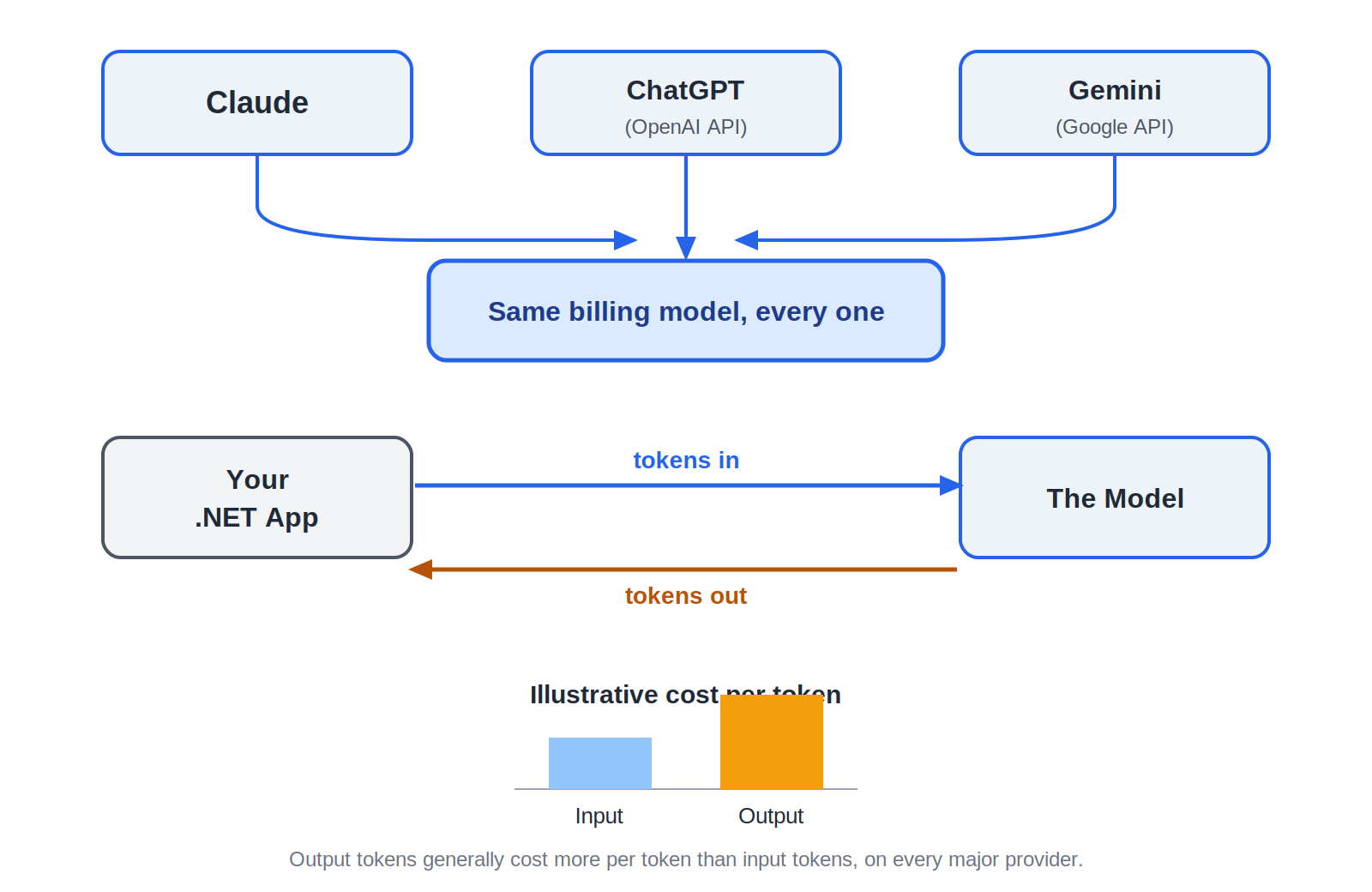
Plain version, no tool involved yet. Whichever model you're talking to doesn't charge you a flat fee per question, the way a fixed-price product would. It charges you based on how much text was involved, both what you sent it and what it wrote back. The unit it measures that in is called a token, and a token is roughly a small chunk of text, often close to a word, sometimes a piece of one.
Think of it the way you'd think of minutes on a phone plan, or units on an electricity meter. Nobody bills you a flat rate no matter how long the call lasts or how much power you used, you get billed for the amount of the thing you actually consumed. Tokens are that same idea, applied to text instead of minutes or kilowatts.
Here's the one detail worth knowing before you've even used the tool: the text a model writes back to you almost always costs more, per token, than the text you sent it. Across every major provider, generating an answer is more computationally expensive on their end than reading your question was, so the two directions are priced differently, output higher than input. That's true everywhere, not just here.
Now let's see it for real, and this time let's actually see the tokens, not just the dollars. Back in your Claude Code session, before you type anything else, check both numbers at once:
/cost
Total cost: $0.00
/context
Context Usage
18k/200k tokens (9%)

Messages:               0 tokens (0.0%)
Now type this exact question and let it answer:
What does this project do, in two sentences?
Check both again:
/cost
Total cost: $0.02
/context
Context Usage
18.3k/200k tokens (9.2%)

Messages:             310 tokens (0.2%)
Look at those two numbers side by side. The dollar figure and the token count are the same event, described two different ways. Claude Code didn't charge you a flat fee for asking a question, it counted roughly 310 tokens across your question and its answer, and the $0.02 is that count multiplied by the price per token. Now ask something that needs a much longer answer:
Give me a detailed, paragraph-by-paragraph explanation of every file in this project.
Check /cost and /context a third time. Both numbers will jump again, and this time the jump will be noticeably bigger than the first one, out of proportion to how much longer your question itself was. That's the input-versus-output asymmetry from a moment ago, showing up as actual tokens and actual dollars instead of a claim on a page.
Here's the same idea laid out visually, worth having a picture of in your head going forward:
Concept three: what "context" actually means
Plain version first, again. A model has no memory of its own between one request and the next. None. Imagine talking to someone who completely forgets the conversation the instant they finish speaking. The only way to keep talking to that person as if you're having an ongoing conversation is to hand them a full written transcript of everything said so far, every single time, right before they answer you again. That transcript, plus whatever instructions and background material they need to do their job, is what's called "context." It's not a separate memory the model has. It's a bundle handed over fresh, every time.
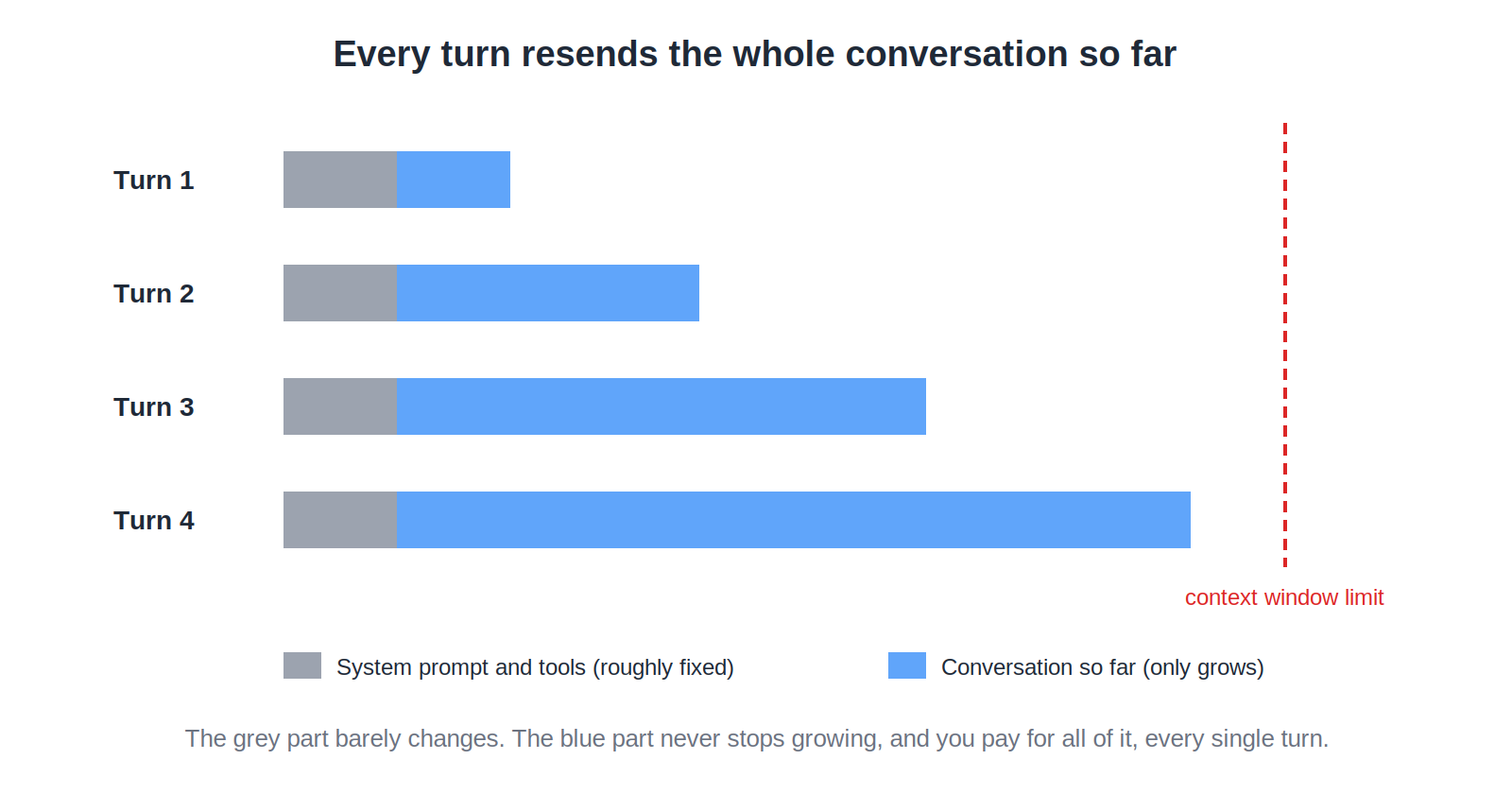
Two consequences fall directly out of that. First, there's a limit to how much can be handed over in one go, called the context window, a hard ceiling on how much text fits into a single request before the provider simply won't accept any more. Second, and this is the one that catches people off guard, if you're having what feels like a ten-message conversation, message ten isn't billed for just message ten. It's billed for the entire transcript of messages one through nine, plus the new one, because that's genuinely what got sent.
Now let's see it for real. In that same session, run:
/context
You'll see a breakdown roughly like this:
Context Usage
22k/200k tokens (11%)

System prompt:      2.6k tokens  (1.3%)
Built-in tools:     17.6k tokens (8.8%)
Project notes:        300 tokens (0.2%)
Messages:             620 tokens (0.3%)
Free space:           178.5k     (89.4%)
Before you read anything into "Messages," look at "System prompt" and "Built-in tools" first, and notice they're not zero either, even though you didn't write either of them. Here's why: Claude Code itself needs instructions to know how to behave, and it has built-in abilities, reading files, running commands, that also have to be described in full so the model knows they exist and how to use them. Those descriptions get sent as context on every single request too, exactly the same as your own typing does, they're just supplied by the tool instead of by you. That's the "background material" from a moment ago, made visible and labeled.
Now have a real back-and-forth. Work through something like this, one at a time, letting Claude Code answer each before you send the next:
Explain what the largest file in this project does.
Now suggest one small, specific improvement to it.
Show me what that change would actually look like.
Now explain a different file in the project.
Keep going for eight or ten exchanges total, the way you'd genuinely work through a real task. Then check the breakdown again:
/context
Context Usage
41k/200k tokens (21%)

System prompt:      2.6k tokens  (1.3%)
Built-in tools:     17.6k tokens (8.8%)
Project notes:        300 tokens (0.2%)
Messages:           20.5k tokens (10.3%)
Free space:           159k       (79.4%)
Compare the two breakdowns directly. System prompt, Built-in tools, and Project notes barely moved, they're roughly fixed overhead. "Messages" is the only line that grew substantially, from 620 tokens to over 20,000, because every one of those exchanges got resent, in full, along with each new one. That's not Claude Code being inefficient. That's the actual mechanic of a stateless conversation, made visible in your own session.
That's the same growth, drawn out:
Concept four: why caching exists, and what it fixes
Plain version. If a model has no memory and everything gets resent every time, that sounds wasteful, because it is, unless something's done about the parts that never actually change. Imagine emailing the same large attachment to a colleague fifty times in one day. A halfway sensible mail system would notice the attachment hasn't changed, actually send it in full once, and just reference "same as before" for the other forty-nine, instead of paying the cost of resending it in full every single time. That's what caching does for a model conversation. Content that stays the same across many requests, a long set of instructions, a big reference document, gets marked once, stored briefly, and reused cheaply instead of reprocessed at full price on every call.
Here's the part I want to be completely unambiguous about: this is automatic. You don't turn it on, you don't configure anything, there's no setting to flip. Claude Code has been caching large, stable parts of what it sends on your behalf this entire chapter, its own instructions, your project's background material, the earlier part of your conversation, quietly discounting all of it and only paying full price for what's genuinely new in each turn. Every exercise you've already done had this running in the background whether you knew it or not.
Now let's see it for real, and the best way to understand a discount is to watch it disappear for one turn. Mid-session, switch models:
/model opus
Then ask the exact same question you opened Idea two with:
What does this project do, in two sentences?
It'll take noticeably longer than it did the first time, and the next /cost check will show a bigger jump than a normal turn does. That's not the new model being slow for no reason. Each model keeps its own separate cache, so the moment you switch, there's nothing cached to reuse yet, and that one turn gets processed at full price before the automatic discount picks back up on the turns after it.
Here's the same before-and-after, laid out for a repeated batch of calls instead of one conversation:
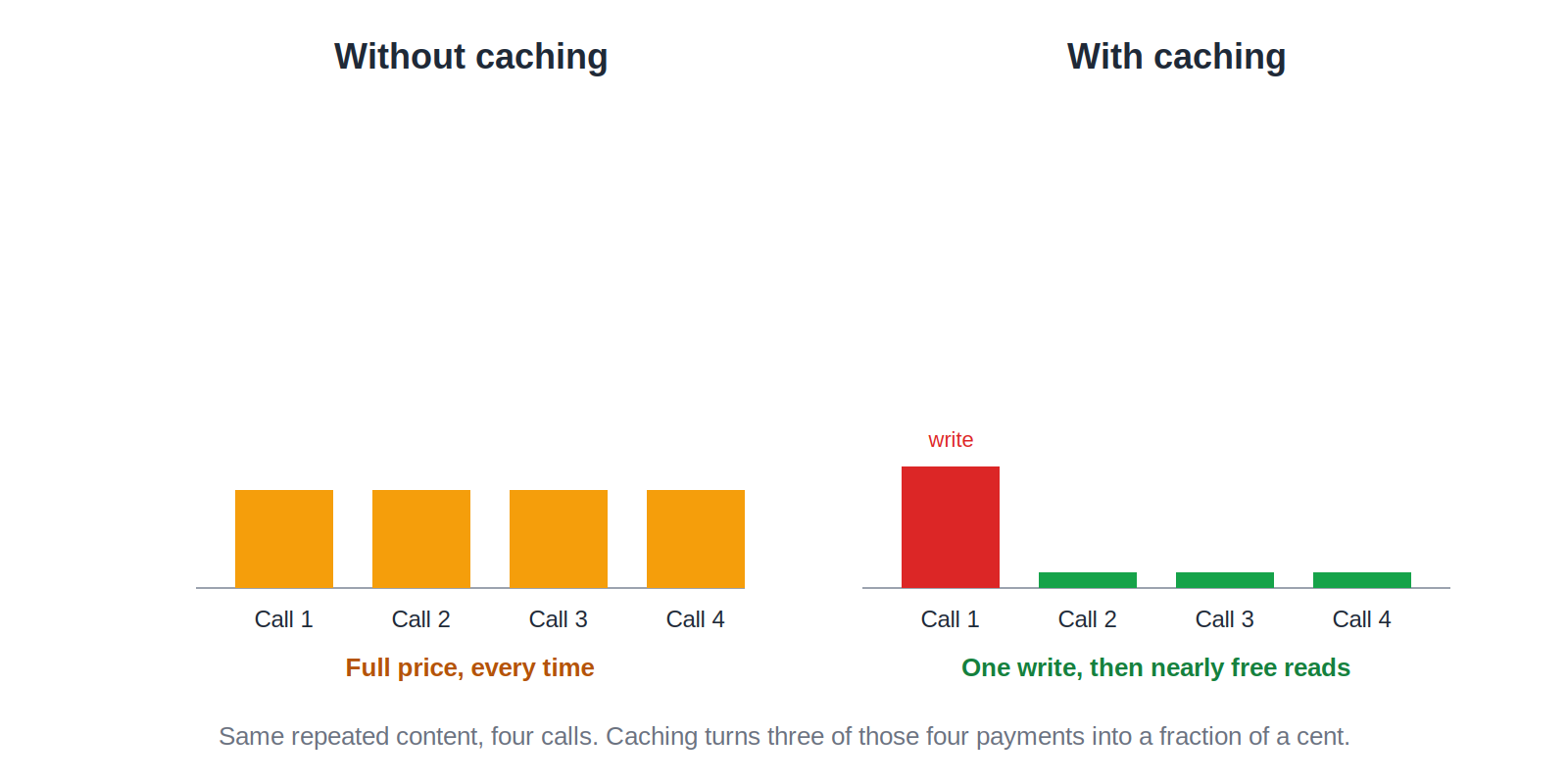
Every major provider offers some version of this, automatically or as something you can explicitly turn on for your own application. The exact discount and the exact time window differ by vendor, and are worth checking directly when it matters. The idea you just watched happen, and just watched break, doesn't change from one provider to the next.
Concept five: the one dial that isn't about cost at all
Everything so far has been about how much you pay. This last one is about how a model behaves, a separate question entirely. There's a well-known setting, usually called temperature, that controls how predictable or how varied a model's answers are. Picture asking the exact same trivia question to two different people, one who gives you the single most obvious, textbook answer every time without fail, and another who's a bit more willing to surprise you with something less expected. Temperature is the dial between those two personalities. Turned low, you get the reliable, repetitive answer. Turned up, you get more variety, and occasionally something stranger.
You won't find this dial anywhere in Claude Code, on purpose. Claude Code is built to be a dependable coding collaborator, and predictable, boring-on-purpose behavior is exactly what you want from that. So this is the one idea in this chapter you'll have to step outside Claude Code to actually see.
Now let's see it for real, in a different room. Anthropic runs a browser-based tool called the Console Workbench, no installation, no code, just a text box in your browser where you can send a prompt to a model directly. OpenAI and Google both offer the same kind of thing for their own models. Here's the sequence:
- Open the Workbench and pick a model that still lets you adjust temperature.
- Type this prompt into the message box:
Write a one-line tagline for a coffee shop. - Find the temperature setting, usually in a model settings panel to the side, set it low, and run the prompt. Note the answer.
- Without changing anything else, turn the temperature up and run the exact same prompt again.
The low setting will give you nearly the same answer both times you try it. The high setting will give you two noticeably different ones.
One honest caveat while you're in there: this specific dial isn't guaranteed to exist forever, exactly as described, on every model. Claude's newest Sonnet model actually removed the ability to adjust it at all, after years of supporting it. That's not a mistake anywhere, it's a deliberate change on Anthropic's part. The real lesson isn't about that one model, it's that a setting you read about somewhere, for any provider, is a claim about the past. Always check what the model you're actually using supports today.
Why none of this stops being true when you change vendors
Look back at everything you just watched happen. You picked a cheap model for an easy question and a capable one for a hard one, and felt the cost difference. A token count and a dollar figure moved together for the exact same exchange. A context breakdown showed real overhead before you'd typed a word, then showed your own conversation become the dominant cost as it grew. A cache miss made one turn visibly slower and pricier than the rest. Two settings on the same prompt gave you two different personalities.
Every one of those things is true on ChatGPT's API and true on Gemini's API as well, multiple model sizes to choose from, tokens metered on both sides, a conversation your application has to resend rather than something the model remembers, some form of caching for content that hasn't changed, and a settings dial that shapes tone and variety separately from cost. The dashboards look different. The exact numbers differ, and are worth checking directly whenever you're actually deciding between providers. What you just spent this chapter learning doesn't reset when the vendor name does.
Where this leaves you
Nothing you did in this chapter required writing a single line of code. You watched real numbers move in a tool you'd already had open since Chapter 1, and in doing that, you now understand what actually drives an LLM bill and how an LLM actually behaves, in language that has nothing to do with any one vendor.
If you only take a handful of things from this session, make it these:
- A model is the actual AI doing the work, every major provider ships multiple sizes of it, and bigger, more capable models cost more because they genuinely do more computational work.
- Tokens are the metered unit behind every LLM bill, not a flat per-question fee, and generating an answer costs more per token than reading your question did.
- The model remembers nothing on its own. Every conversation is resent in full on every turn, which is why cost and context both grow with conversation length, not just with what you type.
- Caching is automatic where it's built into a tool like Claude Code, no configuration required, and the fastest way to understand its value is to watch it break, which happens the moment something like the model itself changes mid-conversation.
- Settings like temperature shape a model's personality, not its price, live outside tools like Claude Code by design, and aren't guaranteed to exist forever exactly as documented on any given model.
- None of this is Claude-specific. You now know how to read the economics of any LLM provider you'll ever work with.
You already knew how to reason about a metered service and a settings panel long before this chapter. You just spent a session watching that instinct apply, exactly, to a kind of dependency you'd never pointed it at before.
That's Chapter 3 of AI for .NET Engineers done.
If you want future chapters the moment they're out, subscribe to the series.