
Know Your Production Hosting Cost Before You Choose Your Tech Stack
Nobody checks the pricing page until the bill lands. By then, the architecture is locked, the budget is blown, and the uncomfortable conversation with finance is already scheduled.
Most teams think about tech stack cost last.
Someone on the team knows a framework well. The CTO read an article about a managed database service. The client is already on Azure. Capability, familiarity, and existing relationships drive the decision. The architecture gets designed. The prototype gets built. Everyone is happy.
Then the system goes to production.
Real traffic. Real data volumes. Real scale.
And the first cloud hosting bill arrives.
It is three times what anyone estimated. Not because the system is broken. Not because traffic spiked unexpectedly. Just because nobody modelled what the stack would actually cost to run at the volume the business needed.
This is not an Azure problem. It is not a Cloudflare problem. It happens on AWS, GCP, Vercel, Heroku, and every other platform. It happens on every stack, every language, every company size. The tool names change. The pattern does not.
This is one of the most avoidable mistakes in software engineering. And it keeps happening because teams treat cost as an operational concern that comes after the architecture is decided.
It should be the first filter applied to any technology decision.
Not the last.
Not an afterthought reviewed when the first bill lands.
The first question asked when evaluating any component of the stack.
This article explains why. And what it looks like in practice.
📍 Why Tech Stack Cost Always Gets Pushed to the End
The logic sounds reasonable on the surface.
"We can't know the real cost until we know the real architecture. And we can't know the real architecture until we've built something."
So cost review happens after the architecture is settled.
Which in practice means it happens after the first serious bill.
Here is the problem with that logic:
Every technology choice is a financial commitment made at engineering time.
The moment you add Azure Cosmos DB to the architecture diagram, you have committed to a monthly invoice for as long as the system runs. The architecture review is also a budget review. Whether the team treats it that way or not.
The second reason cost gets deferred is prototype pricing. Everything looks affordable in development.
- Azure App Service B1: ~$13/month. Looks fine.
- MongoDB Atlas free tier: $0. Even better.
- Cloudflare free plan: SSL, CDN, DDoS protection. All free.
The gap between development pricing and production pricing is invisible until you cross it.
And by then, the architecture is locked.
This is also a system thinking problem. Most architecture captures structure, not behaviour. A diagram that shows boxes and arrows does not show what those boxes will cost to run at month six. It shows what the system looks like. Not what it will cost to keep alive.
🔍 What Happens When Cost Is Not Step 1
Let me walk you through the pattern I have seen repeated across projects.
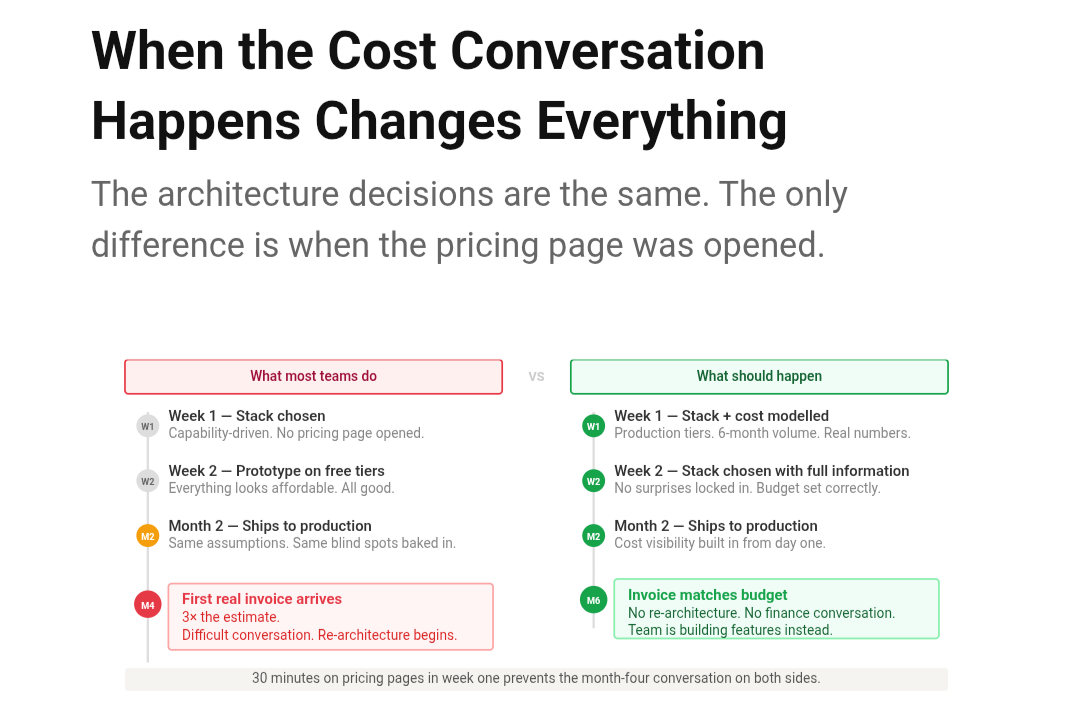
Week 1: Stack is chosen. Capability-driven. Nobody opens a pricing page.
Week 2 to 4: Prototype is built on free tiers and dev plans throughout.
Month 2: System ships to production. Same assumptions. Same tiers.
Month 4: First real invoice arrives.
Month 4, same day: Difficult conversation with finance. Re-architecture discussed. Timeline slips.
Every step in that sequence was predictable.
The cost was never a mystery. It was just never looked at.
Now compare that with a team that makes cost Step 1:
Week 1: Stack candidates identified. Pricing pages opened. Cost modelled at 6-month volume. Stack chosen with full information.
Month 2: System ships. Budget was set correctly from day one. No surprises.
Month 6: Invoice matches estimate.
Same architecture. Same application. Same requirements.
The only difference is when the pricing page conversation happened.
💸 Cloud Hosting Cost Reality: The Numbers Behind "Free" and "Cheap"
This is where most teams get caught.
The examples below use Cloudflare and Azure because they are widely used and the pricing is well documented. But the pattern they illustrate is not specific to these tools. The same gap between development pricing and production pricing exists on AWS, GCP, Vercel, Supabase, Railway, and every managed service you have ever used. Read these as examples of a universal principle - not as a list that only applies if your stack matches exactly.
Let's go through the real numbers.
Cloudflare
The free plan gives you SSL, CDN, DDoS protection, and DNS. For a startup or a side project, that is genuinely remarkable. But free has hard limits.
| Feature | Free | Pro ($20/mo) | Business ($200/mo) |
|---|---|---|---|
| SSL | Yes | Yes | Yes |
| Basic WAF | Yes | Yes | Yes |
| Advanced WAF rules | No | Yes | Yes |
| Custom page rules | 3 | 20 | 50 |
| Image optimisation | No | Yes | Yes |
| Load balancing | No | No | Yes |
The moment your project needs one paid feature, the entire cost model changes. Teams that built their architecture on "Cloudflare is free" get a surprise the first time they need something that sits behind a plan upgrade.
Let's Encrypt is similar. Free SSL. Automated. Widely trusted. But 90-day certificates require automated renewal. If your infrastructure does not handle renewal automatically, that "free" certificate becomes an ops task someone has to own - and an expiry incident waiting to happen at the worst possible moment.
Azure App Service - The Most Common Trap
This is where Azure teams get hit hardest.
| Plan | vCores | RAM | Cost/mo | Reality |
|---|---|---|---|---|
| B1 | 1 | 1.75 GB | ~$13 | Dev and testing only |
| S1 | 1 | 1.75 GB | ~$73 | Light production |
| P1v3 | 2 | 8 GB | ~$138 | Real production |
| P1v3 x2 instances | 2+2 | 8+8 GB | ~$276 | Production with availability |
B1 is not a production plan.
It is a development plan with a production-sounding name.
Teams that budget on B1 pricing and then discover they need P1v3 are looking at a cost that is 10x their original estimate for that single line item alone - before the database, the cache, the storage, or anything else.
And this is just compute. The real production design of an Azure web app involves database pressure, connection pool limits, caching layers, and security boundaries - none of which appear on the B1 pricing page.
Azure SQL - The Category Jump Nobody Talks About
| Tier | DTUs / vCores | Storage | Cost/mo | Reality |
|---|---|---|---|---|
| Basic | 5 DTUs | 2 GB | ~$5 | Demos only |
| Standard S2 | 50 DTUs | 250 GB | ~$150 | Moderate production |
| General Purpose | 4 vCores | 20 GB+ | ~$370 | Standard production |
| Business Critical | 4 vCores | 20 GB+ | ~$650+ | High availability |
The jump from Basic to General Purpose is not incremental.
It is a category change. And if that number was not in the budget conversation at design time, it becomes a very uncomfortable conversation four months later.
Worth knowing: scaling up your app tier to handle performance problems does not help if Azure SQL is the actual bottleneck. More App Service instances = more concurrent database connections = higher pressure on a database that was already struggling. That is a pattern that makes performance worse, not better, and it comes with a cost attached to every new instance.
Azure Cosmos DB - The One That Surprises Even Experienced Teams
Cosmos DB is priced on Request Units per second (RU/s) per container.
- Minimum: 400 RU/s per container = ~$23/month per container
- Sounds manageable. Until you count containers.
| Scenario | Containers | RU/s each | Monthly cost |
|---|---|---|---|
| Simple app | 2 | 400 | ~$46 |
| CQRS read models | 8 | 400 | ~$184 |
| Event-sourced system | 15 | 400 | ~$345 |
| Under real production load | 10 | 1,000 | ~$576 |
And 400 RU/s is genuinely low. A single complex query can consume hundreds of RUs. Under real load, provisioned throughput needs to be significantly higher than the minimum.
Teams that choose Cosmos DB for its flexibility - a real advantage - without modelling the RU cost at expected query volume often find it becomes the largest line item on the invoice.
The "Invisible" Costs Nobody Models
Even teams that model per-service pricing miss an entire category of costs that compound quietly in the background.
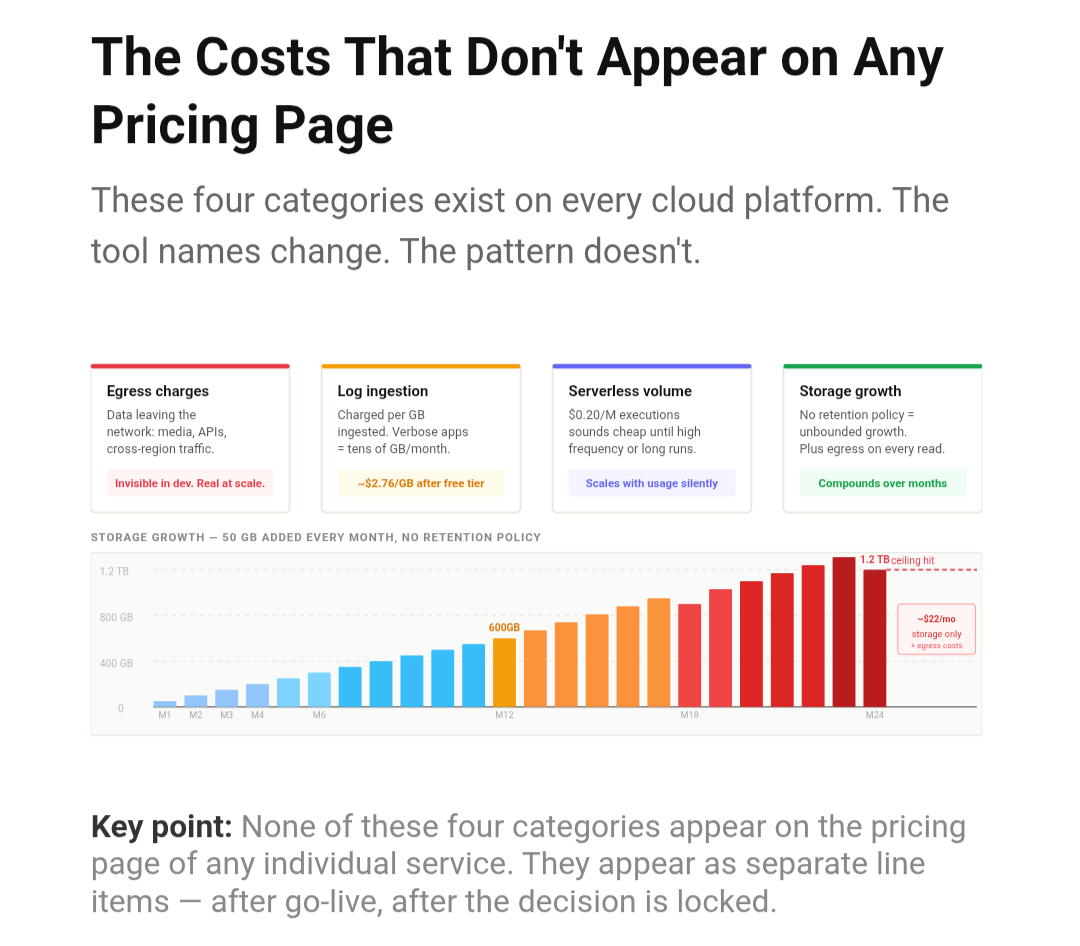
🔴 Egress charges
Azure charges for data leaving the network. Media files, large API responses, cross-region traffic - these accumulate in direct proportion to usage. Invisible in development. Very real on the production invoice.
🔴 Log Analytics ingestion
Azure Monitor charges ~$2.76/GB beyond the free tier. One application logging full request and response payloads can ingest tens of gigabytes per month. Nobody budgets for this because it does not appear on the pricing page for App Service or Azure SQL. It appears as its own surprise line item.
🔴 Storage growth
Azure Blob Storage is ~$0.018/GB/month. At 100GB that is $1.80 - invisible. But at 50GB of new data per month, the same system reaches 600GB after a year and 1.2TB after two. Add egress charges on every read, and a cost that looked negligible becomes meaningful.
🔴 Azure Functions consumption plan
$0.20 per million executions, with the first million free. Looks cheap. Until Functions run at high frequency or with long execution times. The same problem as any other performance optimisation - the numbers that look fine at low scale stop looking fine under real load.
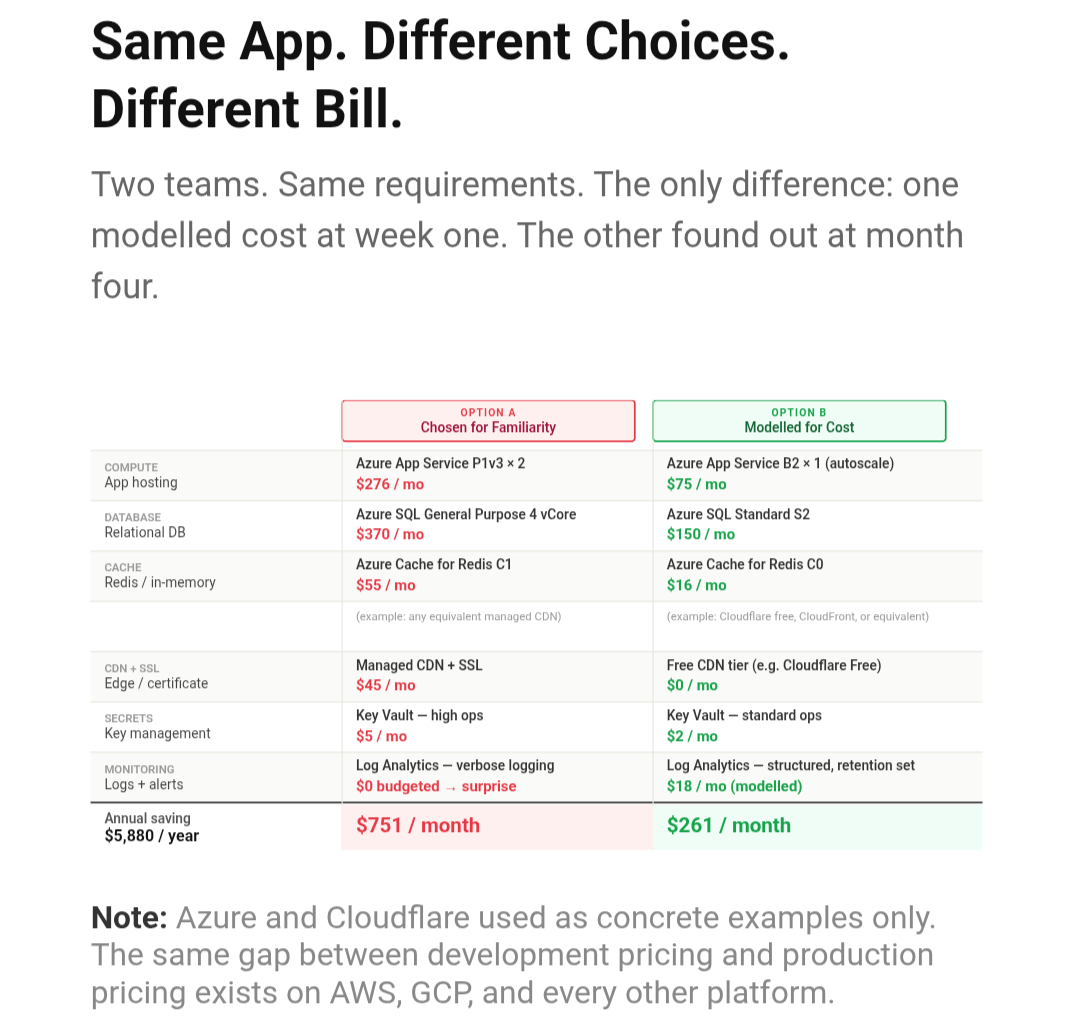
📊 Same App. Different Choices. Different Bill.
Here is what this looks like when you put it all together.
Neither option is wrong in isolation.
Option A may be entirely justified if the workload demands it. Option B may be insufficient if the application genuinely needs the higher tier. The point is not that cheaper is always better.
The point is that this conversation needs to happen at design time, not at billing time.
$6,096 per year difference. Same application. Same business requirements. Different choices made in week one.
✅ How to Model Tech Stack Cost Before You Commit
This is not a complex process. It is a thirty-minute exercise per service.
For every component in the architecture, answer three questions before adding it:
1. What tier is actually required for production?
Not the free tier. Not the dev tier. The tier that handles expected production volume with acceptable performance and availability.
Open the pricing page. Find that tier. Write down the monthly cost.
2. What grows with usage, and how fast?
Identify every component that scales with traffic, data volume, or time: storage, request volume, log ingestion, egress, API calls to rate-limited services.
Model the cost at six-month and twelve-month volume. Not precisely - a reasonable estimate is enough. The goal is to surface surprises, not produce a financial model.
3. What looks free now but has a paid version you will need?
For every free-tier dependency:
- What is the first feature that requires a paid plan?
- What does that plan cost?
Cloudflare Free to Business = $200/month.
MongoDB Atlas Free to production cluster = $57/month minimum.
Azure App Service B1 to P1v3 = 10x cost increase.
These upgrades are predictable. Model them before they happen.
Combining this with the right questions at requirement stage gives you a complete picture before a single line of code is committed.
🔥 The Deeper Reason This Matters
There is a practical financial argument for doing this. The surprises are real. The re-architecture is expensive. The conversations with finance are uncomfortable. Cloud cost optimization is much easier when you start with accurate numbers than when you are trying to reduce a bill that is already running.
But there is a more fundamental reason.
Architecture decisions made without cost visibility are not complete decisions.
The team evaluated capability, performance, and familiarity. But they did not evaluate the full financial commitment being made. That incompleteness shows up eventually. On the first invoice. In a budget review. When a cost-driven re-architecture becomes necessary twelve months in.
This is not just a finance problem. It is a definition-of-done problem.
Your job is not to ship code. It is to make sure the system survives production. A system that works technically but produces invoices that constrain the business is not a system that has survived production. It is a system that is slowly creating a problem nobody planned for.
Making cost visible from the start does not constrain good architecture.
It completes it.
The stack that meets requirements, performs at the required level, and costs what the business can sustain is a better architecture than one that performs brilliantly but produces bills that restrict investment everywhere else.
This applies whether you are on Azure or AWS. Whether you are using Postgres or Cosmos DB. Whether your CDN is Cloudflare or CloudFront. The tool names in this article are examples. The principle behind them is not.
Cost is not a constraint on good engineering.
It is a dimension of it.
💬 What You Can Do Today
✅ Pick one service in your current architecture. Open its pricing page. Find the production tier. Write down the monthly cost. If it surprised you - now you know where to start.
✅ If you are starting a new project, block two hours in week one for a cost modelling session. Not a formal process. Just pricing pages, a spreadsheet, and honest numbers.
✅ If you are leading a team, make the cost estimate a required output of the architecture review - the same way performance benchmarks and security requirements are. Not optional. Not deferred.
✅ Share this with someone about to kick off a new project. The pricing page conversation in week one is thirty minutes. The invoice conversation in month four is significantly longer.
Gaurav Sharma writes at thetruecode.com on production systems, architecture decisions, and the real lessons behind building software that lasts.
If this was useful - share it. Someone on your team is about to make a stack decision right now. This might save them a difficult conversation.